Embark on a journey into the dynamic world of mobile app development. This comprehensive guide provides a structured approach to understanding the essential aspects of creating engaging mobile applications for iOS and Android platforms. From foundational concepts to advanced deployment strategies, we’ll equip you with the knowledge and skills needed to navigate the exciting realm of app creation.
The guide explores the core principles of mobile app development, encompassing various stages from conceptualization to launch. This detailed walkthrough will take you through choosing a development platform, mastering fundamental programming languages, and employing essential tools. Moreover, it addresses critical aspects like design, user experience, deployment, and monetization.
Introduction to Mobile App Development

Mobile app development has revolutionized how we interact with technology, enabling users to access information, connect with others, and manage their lives from their mobile devices. This field encompasses a wide range of applications, from simple utility apps to complex games and productivity tools. Understanding the diverse landscape of mobile app development is crucial for anyone seeking to enter this dynamic industry.Mobile app development is a multifaceted field encompassing the design, development, testing, and deployment of applications for various mobile operating systems, most notably iOS and Android.
The process involves a blend of technical expertise, creative thinking, and a deep understanding of user experience (UX). This detailed overview will explore the essential skills, various career paths, and key differences between iOS and Android development.
Essential Skills and Knowledge
A successful mobile app developer requires a combination of technical and soft skills. Proficiency in programming languages such as Swift (iOS) and Java/Kotlin (Android) is paramount. Understanding of user interface (UI) design principles, user experience (UX) best practices, and mobile-specific frameworks is also crucial. Furthermore, a strong grasp of database management, network communication, and debugging techniques is highly beneficial.
Problem-solving abilities, collaboration skills, and a willingness to learn are equally important.
Career Paths in Mobile App Development
The mobile app development field offers diverse career paths, catering to varying interests and skill sets. Entry-level positions include junior developers, focusing on specific tasks within a team. Mid-level roles may involve leading small projects or mentoring junior developers. Senior developers often take on more complex responsibilities, such as designing architecture and leading teams. Specialized roles include UI/UX designers, quality assurance testers, and project managers, each playing a vital part in the app development lifecycle.
Comparison of iOS and Android Development
The choice between iOS and Android development hinges on various factors, including personal preferences, target audience, and project requirements. A comparison of these platforms highlights key differences.
| Feature | iOS | Android |
|---|---|---|
| Platform | Apple’s iOS operating system | Google’s Android operating system |
| Tools | Xcode, Swift, Objective-C | Android Studio, Java/Kotlin |
| Frameworks | SwiftUI, UIKit | Jetpack Compose, Android Jetpack |
| Target Audience | Primarily users of Apple devices (iPhone, iPad) | Users of a vast array of devices from various manufacturers |
| Development Process | Focus on user interface design and polish | Focus on flexibility and wide device compatibility |
The table above demonstrates the key distinctions between iOS and Android development, encompassing tools, frameworks, and target audiences. Understanding these nuances is vital for making informed career choices and selecting the right platform for specific project needs.
Choosing a Development Platform
![Mobile App Development Process [9 Steps Detailed Guide]](https://bisalangsung.web.id/wp-content/uploads/2025/09/Beginners-Guide-to-Mobile-App-Development-copy.png "Mobile App Development Process [9 Steps Detailed Guide]")
Deciding on the appropriate mobile platform for your app is a critical first step in the development process. Factors such as your target audience, available budget, and your team’s technical expertise will significantly influence this choice. Understanding the strengths and weaknesses of each platform, along with cross-platform development options, is crucial for success.A well-informed decision ensures your app reaches the intended users effectively and efficiently, maximizing your investment in time and resources.
Considering the specific requirements of your app and aligning them with the chosen platform is essential for a successful launch.
Factors to Consider
Selecting the ideal platform requires careful consideration of several key factors. The target audience’s demographics and technological preferences are paramount. A gaming app, for instance, might perform better on iOS due to its historical strong user base in the gaming community. Budget constraints are also critical, as developing for both iOS and Android can be more expensive than focusing on a single platform.
Finally, the technical expertise within your development team plays a crucial role, as specific skillsets are often required for each platform.
iOS vs. Android
Developing for iOS (Apple devices) and Android (Google devices) presents distinct advantages and disadvantages. iOS development often involves a more streamlined and controlled environment, leading to potentially higher quality apps. However, this often comes at the cost of wider accessibility, as Android users are significantly more numerous.
- iOS Development Advantages: A tighter ecosystem and established user base can result in a more focused and controlled user experience. Apple’s stringent review process can contribute to higher app quality. Stronger integration with other Apple products can create a more seamless user journey.
- iOS Development Disadvantages: The smaller market share compared to Android may limit the potential user base. The limited flexibility offered by Apple’s design guidelines might be a constraint for some developers.
- Android Development Advantages: The vast user base across diverse devices and operating system versions offers a wide reach to potential users. The open-source nature of Android allows for customization and flexibility in development.
- Android Development Disadvantages: Maintaining compatibility across different Android versions and devices can be challenging, leading to compatibility issues. The broader range of devices can lead to inconsistencies in user experience across different devices.
Cross-Platform Development Tools
Cross-platform development tools allow developers to create apps for multiple platforms (like iOS and Android) using a single codebase. This approach can significantly reduce development time and costs. However, compromises in performance or features may be necessary to achieve this level of code reuse.
Comparison of Cross-Platform Frameworks
Several cross-platform frameworks offer varying degrees of efficiency and compatibility. Choosing the right framework depends on specific project needs and team expertise.
| Framework | Strengths | Weaknesses |
|---|---|---|
| React Native | Excellent community support, component-based architecture, and hot reloading capabilities. Its JavaScript-based nature allows for rapid prototyping and development. | Performance can be an issue compared to native development, especially for complex apps. Integration with native features can be challenging. |
| Flutter | Excellent performance, native-like UI, and a fast development cycle. Its Dart language provides a strong foundation for creating high-quality applications. | Smaller community support compared to React Native. Limited support for older devices might be a constraint. |
| Xamarin | Strong integration with native platforms, allowing for more direct access to device features. .NET-based language enables a familiar development experience. | Can be more complex to learn, especially for developers unfamiliar with .NET. Maintenance of the codebase can be more demanding. |
Learning the Fundamentals
Mastering the fundamentals is crucial for success in mobile app development. A strong foundation in programming languages, design principles, and data handling ensures you can create robust and user-friendly applications. Understanding these core concepts empowers you to tackle complex challenges and build applications that meet user needs effectively.
Essential Programming Languages
Mobile app development relies on specific programming languages tailored for each platform. Understanding these languages is paramount to building functional and efficient applications. Swift, Java, and Kotlin are prominent choices.
- Swift is Apple’s proprietary language, primarily used for iOS and macOS app development. Its focus on safety and conciseness makes it a popular choice for developers creating applications for Apple devices.
- Java is a versatile language used for Android app development. Its platform independence and vast ecosystem of libraries and frameworks make it a powerful tool for building Android applications.
- Kotlin, an increasingly popular choice for Android development, offers interoperability with Java and a more concise syntax than Java. Its modern features and growing community make it a strong contender for Android development.
Essential Mobile Development Concepts
A comprehensive understanding of mobile development concepts is essential for crafting effective applications. These concepts include user interface design, application architecture, and data handling.
- User Interface (UI) Design: Effective UI design is critical for user engagement and satisfaction. Mobile apps often employ intuitive layouts, interactive elements, and responsive design to ensure a seamless user experience across various devices and screen sizes.
- Application Architecture: A well-structured application architecture is key to maintainability, scalability, and performance. Modern applications often employ modular designs, separating concerns to create organized and robust applications.
- Data Handling: Efficient data handling mechanisms are crucial for application functionality and user experience. Mobile applications frequently use databases or cloud storage for managing data effectively, ensuring data integrity and accessibility.
Recommended Online Resources
Numerous online resources offer structured learning paths and practical exercises for mobile app development.
- Online Courses: Platforms like Udemy, Coursera, and edX offer comprehensive courses covering various mobile development aspects, often with practical projects and hands-on exercises.
- Documentation and Tutorials: Official documentation from Apple (for Swift) and Google (for Android) provide detailed explanations, code examples, and step-by-step tutorials to help developers learn the intricacies of each platform.
- Developer Communities: Active online communities like Stack Overflow and specific mobile development forums provide valuable support, answers to questions, and insights from experienced developers.
Practical Exercises for Beginners
Practical exercises are essential for solidifying the fundamentals of mobile app development.
- Simple Calculator App: Building a basic calculator app helps familiarize developers with UI design, input handling, and arithmetic operations. This exercise reinforces core programming concepts.
- To-Do List App: Developing a simple to-do list application allows developers to explore data storage, user input management, and basic application logic. This practice familiarizes them with organizing tasks and managing data effectively.
- Basic Quiz App: A simple quiz application lets developers practice UI elements, data handling, and managing different question types. This provides a hands-on approach to implementing quiz logic.
Essential Tools and Technologies
Mastering mobile app development hinges on utilizing the right tools and technologies. These tools streamline the development process, enhance efficiency, and ensure the creation of robust and high-performing applications. A well-chosen set of tools and technologies paves the way for a smoother development journey, enabling developers to focus on the core logic and functionality of their apps.
Essential Development Tools
A comprehensive toolkit is crucial for successful mobile app development. These tools provide the necessary infrastructure and support for building, testing, and deploying applications. The choice of tools often depends on the specific development platform and project requirements.
- Integrated Development Environments (IDEs): IDEs like Android Studio and Xcode offer a comprehensive environment for coding, debugging, and testing mobile applications. They provide features such as code completion, debugging tools, and integrated build systems. These tools significantly enhance developer productivity and ensure consistent development practices.
- Simulators and Emulators: Simulators and emulators are invaluable for testing applications on various devices and operating systems without needing physical devices. They allow developers to simulate user interactions and identify potential issues before deploying to real devices. This iterative testing process helps identify and fix bugs early on, saving time and resources.
- Version Control Systems (e.g., Git): Version control systems like Git are essential for managing code changes and collaborating with other developers. They track every modification made to the codebase, allowing developers to revert to previous versions if needed. This is crucial for maintaining a clean and organized code history, crucial for large-scale projects.
Version Control Systems
Version control systems, exemplified by Git, are critical for managing codebases, enabling collaboration, and maintaining a history of changes. They track every modification, enabling rollback to previous versions, crucial for addressing errors or incorporating new features. This systematic approach to code management is paramount in a team environment, ensuring smooth collaboration and efficient troubleshooting.
- Branching and Merging: Git allows developers to create branches for independent work, enabling parallel development. Merging these branches back into the main codebase ensures that changes are integrated smoothly. This is essential for managing different features or bug fixes concurrently, ensuring a robust and consistent codebase.
- Collaboration and Conflict Resolution: Git facilitates seamless collaboration among team members. The system effectively manages conflicts that may arise when multiple developers work on the same code simultaneously. This crucial feature minimizes conflicts and ensures that all modifications are properly integrated.
Testing and Debugging
Thorough testing and debugging are indispensable for creating reliable and functional mobile applications. Comprehensive testing procedures identify and rectify bugs, ensuring the application performs as expected across various devices and scenarios. Testing and debugging are integral parts of the development lifecycle, crucial for releasing high-quality products.
Debugging Strategies
| Feature | iOS (Xcode) | Android (Android Studio) |
|---|---|---|
| Breakpoint Setting | Set breakpoints in code to pause execution and inspect variables at specific points. | Set breakpoints in code to pause execution and inspect variables at specific points. |
| Logging | Utilize Xcode’s logging tools to print debug messages to the console. | Utilize Android Studio’s logging tools to print debug messages to the console. |
| Variable Inspection | Inspect the values of variables during execution. | Inspect the values of variables during execution. |
| Exception Handling | Handle exceptions and errors using try-catch blocks. | Handle exceptions and errors using try-catch blocks. |
| Profiling | Profile the application to identify performance bottlenecks. | Profile the application to identify performance bottlenecks. |
App Design and User Experience (UX)
A successful mobile application hinges not just on functionality, but also on a seamless and engaging user experience. Understanding user-centered design principles and implementing effective UI design is crucial for creating applications that users will not only adopt but also actively enjoy. This section explores the vital elements of app design that contribute to a positive user journey.User-centered design emphasizes understanding the target user’s needs, behaviors, and motivations.
By deeply analyzing the user’s perspective, developers can create applications that are intuitive, efficient, and ultimately satisfying to use. This approach prioritizes the user’s experience over the developer’s preferences or technical limitations.
User-Centered Design Principles
User-centered design principles guide the design process, ensuring the application caters to the target audience. These principles emphasize empathy, research, and iteration, ultimately leading to a more user-friendly application. Thorough user research informs the design process, leading to applications that meet real user needs. This iterative approach ensures the application aligns with evolving user expectations.
Importance of UI Design
The user interface (UI) is the visual representation of the application. A well-designed UI enhances user engagement, making the app intuitive and easy to navigate. A visually appealing and user-friendly interface contributes to a positive user experience, which directly impacts user satisfaction and retention. The visual elements, layout, and interaction design collectively influence how users perceive and interact with the application.
Wireframing and Prototyping
Wireframing and prototyping are essential stages in app development. Wireframes are low-fidelity visual representations of the application’s structure and layout. Prototypes are interactive models that allow users to experience the application’s functionality before the final development phase. These methods facilitate early feedback and identify potential usability issues. They offer a visual representation of the app’s layout and flow, enabling developers to refine the design before significant development investment.
UI Design Tools
Effective UI design tools expedite the design process and enhance the overall app’s aesthetics. These tools streamline the design process, enabling faster iteration and refinement. They allow developers to rapidly visualize their ideas and test different design options.
- Figma: A popular vector graphics editor, Figma is known for its collaborative features, making it ideal for teams. It facilitates real-time design modifications and collaborative workspaces.
- Adobe XD: A comprehensive design tool by Adobe, XD offers a range of features for creating interactive prototypes and mockups. It seamlessly integrates with other Adobe Creative Cloud applications.
- Sketch: A vector graphics editor tailored for user interface design, Sketch provides intuitive tools for creating high-fidelity designs. It’s a powerful tool for creating detailed and visually appealing interfaces.
- InVision Studio: This tool allows designers to create and share interactive prototypes with users, facilitating early feedback and design refinement. It is particularly valuable for showcasing the app’s functionality before the coding stage.
- Balsamiq Mockups: This tool excels at creating low-fidelity wireframes and prototypes quickly, making it perfect for initial design exploration and user feedback gathering. It streamlines the early stages of the design process, offering a simplified approach to wireframing.
Building Your First App
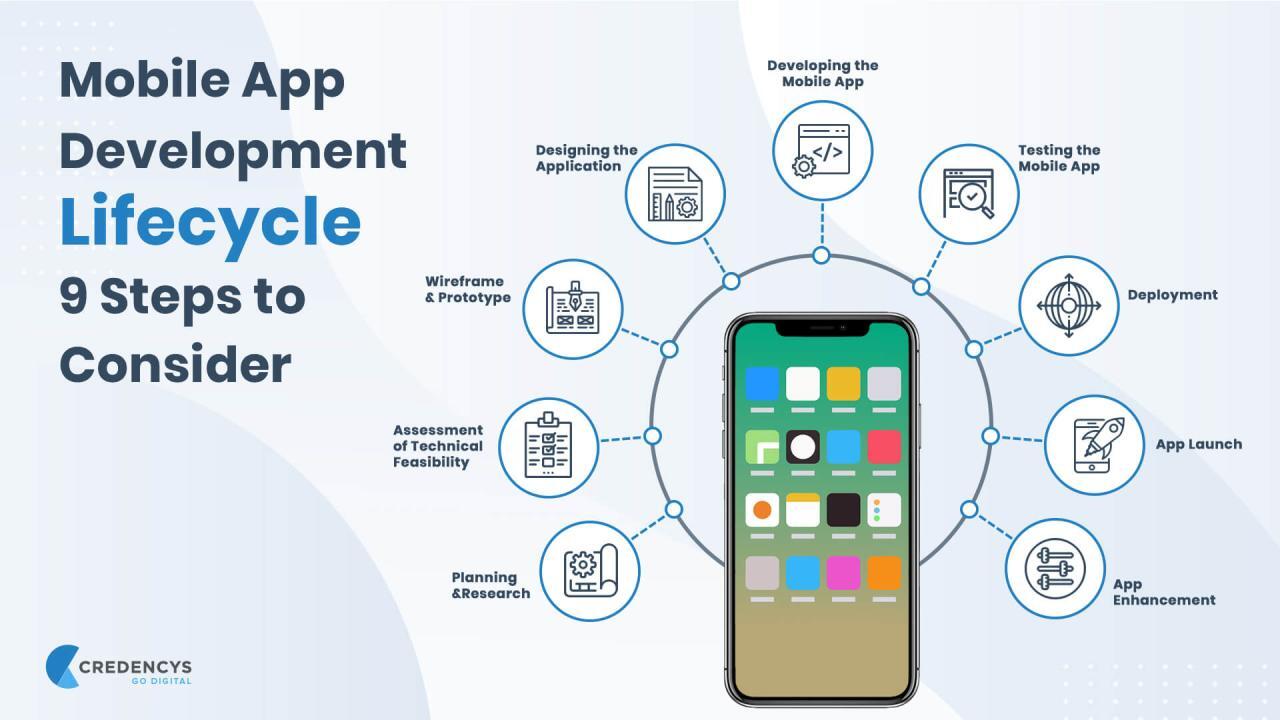
Embarking on your mobile app development journey can be exciting and rewarding. This section will guide you through creating a simple yet functional app, demonstrating the key steps involved. From planning and design to development and testing, we’ll break down the process in a clear and practical way.A fundamental understanding of the app development lifecycle is crucial for success.
This involves careful planning, meticulous design, efficient development, and thorough testing to ensure the final product meets user expectations. This section will guide you through each of these stages, providing actionable steps and practical examples.
A Simple App Idea for Beginners
A compelling app idea for beginners is a simple to-do list application. This allows focusing on core app functionalities without overwhelming complexity. The app will allow users to create, edit, and delete tasks, providing a basic but valuable tool. This will also provide experience with data storage and manipulation, essential for more complex applications.
Planning Your App
The planning phase involves defining the app’s purpose, target audience, and key features. For a to-do list app, this includes specifying the user interface elements (e.g., input fields for tasks, checkboxes for completion status), data storage mechanisms (e.g., a local database or cloud storage), and desired functionalities (e.g., sorting tasks by due date, setting reminders).
Designing Your App
The design phase focuses on creating the user interface (UI) and user experience (UX). This involves sketching wireframes, creating mockups, and defining the visual elements. For the to-do list app, the UI could include input fields for task descriptions, checkboxes for task completion status, and a list view to display tasks. The UX should focus on intuitive navigation and a smooth user experience.
A well-structured wireframe is key to the overall user experience. Mockups should be visually appealing and accurately reflect the intended app functionality.
Developing Your App
This stage involves writing the code to bring the app to life. For a to-do list app, you’ll need to use a programming language and framework (like Swift for iOS or Kotlin for Android). The development process includes creating the necessary input fields, checkboxes, list views, and handling data storage and retrieval.
Example using Swift (iOS):
“`swift// Example Swift code snippet for adding a taskfunc addTask(task: String) // … code to add the task to the data store …“`
Example using Kotlin (Android):
“`kotlin// Example Kotlin code snippet for displaying tasksval tasks = getTasksFromDatabase()tasksList.addAll(tasks)“`
Testing Your App
Thorough testing is essential to ensure the app functions correctly and meets user expectations. This includes testing the app’s functionality, usability, and performance on different devices and operating systems. This includes testing all the user interactions and verifying the correct operation under various scenarios.
Step-by-Step Guide: Building a Simple To-Do List App
- Define App Features: Decide on the core features, such as adding, deleting, and marking tasks as complete.
- Design the UI: Create wireframes and mockups to visualize the app’s interface. For example, a simple to-do list might involve a text field for entering a task, a checkbox to mark it complete, and a button to add the task.
- Choose a Development Platform: Select a platform (e.g., iOS, Android). This will influence the specific tools and programming languages needed.
- Develop the App Logic: Write the code to handle task creation, deletion, and completion. This might involve using a local database or a cloud storage service to save and retrieve tasks.
- Implement UI Elements: Create the visual components of the app (input fields, checkboxes, list views). For example, a text field might be created for entering task descriptions, and checkboxes for marking tasks as completed.
- Test Thoroughly: Ensure the app functions as expected in different scenarios and on various devices. This is critical to catch potential bugs or usability issues before release.
Deployment and Monetization Strategies
Successfully launching and monetizing a mobile application requires careful consideration of deployment methods and revenue models. This crucial stage bridges the gap between development and market presence, ensuring your app reaches the intended audience and generates sustainable income. Effective strategies are vital for long-term success and achieving desired return on investment.Deployment and monetization strategies are intricately linked to the success of a mobile application.
Careful planning and execution of both are essential for reaching target users and generating revenue. These strategies should be tailored to the specific app’s features, target market, and overall business goals.
Deployment Methods for Mobile Apps
Various methods exist for distributing mobile applications to users. Choosing the right approach depends on factors like the app’s nature, target audience, and development resources.
- App Stores (Apple App Store, Google Play Store): These are the primary platforms for distributing mobile applications. They provide a vetted environment for app submission and maintenance, ensuring user safety and app quality. The process involves submitting the app, complying with platform guidelines, and managing updates.
- Alternative App Stores: Smaller app stores or third-party platforms offer an alternative distribution channel, particularly for apps targeting niche markets or specific regions. These stores can have lower barriers to entry but may have limited reach compared to major app stores.
- Direct Downloads: For applications requiring specific functionality or access to sensitive data, direct downloads through a website or dedicated download links may be necessary. This method necessitates managing downloads and updates independently.
Monetization Strategies for Mobile Apps
Various strategies exist for generating revenue from mobile applications. The optimal approach depends on the app’s features, target audience, and overall business model.
- Freemium Model: This popular approach offers a basic version of the app for free, with premium features or content available for purchase. This allows for broader app exposure while encouraging in-app purchases.
- Subscription Model: This strategy provides ongoing access to app features or content in exchange for a recurring subscription fee. It is well-suited for apps with continuous value propositions, like streaming services or productivity tools.
- In-App Purchases (IAPs): IAPs allow users to purchase additional content, features, or enhancements within the app. This model can be highly effective, especially for games or apps with customizable elements.
- Advertising: Displaying advertisements within the app can generate revenue. Different ad formats, like banner ads or video ads, can be employed, although this can sometimes affect user experience.
- Affiliate Marketing: Partnering with other businesses to promote their products or services within the app can lead to commission-based revenue. This model requires strategic partnerships and clear disclosure.
App Store Optimization (ASO)
App store optimization (ASO) is a critical aspect of mobile app success. It involves optimizing the app’s visibility and discoverability within app stores, thereby driving organic downloads. Effective ASO strategies are crucial for reaching potential users without incurring significant marketing costs.
- Research: Identifying relevant s that users are searching for is essential for optimizing the app’s title, description, and other metadata. This improves the app’s visibility in search results.
- Compelling App Descriptions: A concise and engaging app description is critical for attracting potential users. It should highlight the app’s key features, benefits, and target audience.
- High-Quality Screenshots and Videos: Visually appealing screenshots and videos provide a preview of the app’s features and user interface, increasing user interest and download intent.
- App Store Listing Best Practices: Adhering to app store guidelines and best practices ensures the app is reviewed and approved promptly. Consistency in branding and app messaging across the listing is essential.
Continuous Learning and Growth
Staying current in the dynamic field of mobile app development is crucial for success. The technology landscape evolves rapidly, with new frameworks, tools, and design trends emerging constantly. Continuous learning ensures developers remain competitive and can adapt to evolving user expectations.Continuous learning isn’t just about keeping up with the latest trends; it’s about proactively seeking opportunities to improve skills and knowledge.
This involves engaging with the community, experimenting with new technologies, and consistently refining one’s approach to app development.
Resources for Staying Updated
Staying abreast of the latest trends and technologies in mobile app development requires a proactive approach. Numerous resources are available to developers, catering to different learning styles and experience levels. These resources provide in-depth insights into the latest advancements, best practices, and emerging technologies.
- Official Documentation and Blogs: Leading mobile development platforms, such as Google for Android and Apple for iOS, provide comprehensive documentation, tutorials, and blog posts covering the latest updates and features. These resources are often the first place to discover new APIs, SDKs, and development guidelines.
- Developer Forums and Communities: Online forums and communities provide a platform for developers to discuss challenges, share solutions, and learn from each other. These communities are valuable sources of information about real-world application issues and troubleshooting tips.
- Industry Publications and Newsletters: Subscribing to industry publications and newsletters dedicated to mobile app development keeps developers informed about emerging trends, new tools, and significant industry advancements.
- Online Courses and Workshops: Numerous online platforms offer courses and workshops focused on mobile app development, providing structured learning opportunities to master new technologies and concepts.
Importance of Community Engagement
Active participation in the mobile development community is invaluable. Sharing knowledge, collaborating with peers, and gaining insights from experienced developers contribute significantly to professional growth. The collaborative environment fosters innovation and helps address specific challenges in a more efficient manner.
- Collaboration and Knowledge Sharing: Engaging with the mobile development community allows for the exchange of knowledge, best practices, and practical solutions to common challenges. This dynamic exchange fosters innovation and allows developers to learn from each other.
- Problem-Solving and Support: Community members often provide support and guidance for resolving technical issues. Sharing experiences and solutions helps overcome development hurdles more effectively.
- Inspiration and Motivation: Exposure to successful projects and the experiences of other developers can inspire new ideas and approaches to app development. The community’s shared passion for mobile development fosters motivation and helps sustain professional growth.
Relevant Online Communities and Forums
Numerous online platforms serve as valuable resources for mobile developers. These communities provide a space for collaboration, knowledge sharing, and problem-solving.
- Stack Overflow: A comprehensive question-and-answer platform for programmers, including mobile developers, where developers can find solutions to various technical issues.
- Reddit (r/androiddev, r/iOSProgramming): These dedicated subreddits are excellent forums for discussing Android and iOS development-related topics. They facilitate discussion, knowledge sharing, and troubleshooting.
- GitHub: A platform for hosting and managing open-source code. Exploring and contributing to open-source mobile projects provides hands-on experience and valuable insights into different development approaches.
- Developer Forums (e.g., Android Developers, Apple Developer Forums): These platforms provide direct access to information and support from the platform providers.
Methods for Gaining Practical Experience
Practical experience is essential for mastering mobile app development. Engaging in personal projects, contributing to open-source initiatives, and actively seeking mentorship opportunities can significantly enhance practical skills.
- Personal Projects: Developing personal projects allows for experimentation with different technologies, frameworks, and design concepts. This hands-on experience builds a strong foundation for future projects.
- Open-Source Contributions: Contributing to open-source mobile projects allows developers to gain experience working with existing codebases and collaborate with other developers. This experience is invaluable for improving problem-solving and teamwork skills.
- Mentorship Programs: Seeking mentorship from experienced developers provides guidance and insights into best practices. Mentorship can accelerate learning and provide valuable feedback on development approaches.
Last Recap

This guide has provided a roadmap for initiating your mobile app development journey. By understanding the key steps, selecting the right platform, mastering essential tools, and designing a user-friendly experience, you can build successful and impactful mobile applications. Continuous learning and community engagement will be crucial in keeping pace with the evolving landscape of mobile development. We hope this guide empowers you to bring your innovative app ideas to life.