Embark on a journey into the world of C#, a versatile language empowering game and Windows application development. This comprehensive guide provides a structured approach, from fundamental concepts to advanced techniques. Discover how C# seamlessly bridges the gap between coding and creative expression, enabling developers to craft engaging experiences across diverse platforms.
This guide meticulously details the steps to set up your development environment, mastering C# syntax, and exploring game and Windows application development. From simple projects to complex applications, you’ll gain practical insights and valuable resources to build robust and innovative software.
Introduction to C# for Game and Windows Development
C# is a powerful, object-oriented programming language developed by Microsoft. Its versatility extends beyond its initial purpose in the .NET framework, making it a suitable choice for diverse applications, including game development and Windows applications. This comprehensive overview will explore the features and capabilities of C#, highlighting its suitability for these domains and providing a comparison to other languages frequently used in similar contexts.
C# Overview and Suitability
C# is a general-purpose programming language that is strongly typed and object-oriented. This structure aligns well with the object-oriented principles that are fundamental to game and Windows application development. Its integration with the .NET ecosystem provides access to a wide range of libraries and tools, accelerating development. Furthermore, C# is managed by the common language runtime (CLR), which handles memory management, security, and other crucial tasks, allowing developers to focus on application logic.
Key Features for Game and Windows Development
Several features of C# make it a strong contender for game and Windows applications. These include:
- Object-Oriented Programming (OOP): C#’s robust support for OOP principles like encapsulation, inheritance, and polymorphism facilitates the creation of modular and maintainable code. This is especially beneficial for complex games with numerous interacting components.
- Integration with .NET Framework/Core: The extensive .NET libraries provide access to a broad range of functionalities, including graphical user interface (GUI) development, networking, and data access. These readily available resources streamline the development process for Windows applications and game projects that leverage these capabilities.
- Performance and Efficiency: Despite being a managed language, C# achieves commendable performance through just-in-time (JIT) compilation and optimized code execution. This is crucial for demanding applications like games that require smooth performance and responsiveness.
- Large and Active Community: The extensive C# community provides ample resources, support forums, and readily available solutions to address development challenges. This collaborative environment significantly aids developers, especially in the troubleshooting of complex issues.
Common Use Cases
C# is utilized in various game and Windows application contexts:
- 2D and 3D Game Development: C# is employed in game engines like Unity, which supports C# scripting. This enables developers to craft engaging game experiences with robust functionality and intuitive tools.
- Windows Applications: C# is a popular choice for creating Windows applications ranging from simple utilities to complex business applications. Its ease of use and comprehensive framework make it suitable for building user-friendly interfaces and handling data.
- Mobile Games (using Xamarin): The Xamarin framework enables C# developers to build cross-platform mobile applications, including games, that can be deployed on various mobile operating systems with relatively minimal code changes.
Comparison with Other Languages
| Feature | C# | Java | Python |
|---|---|---|---|
| Typing | Strong | Strong | Dynamic |
| Object-Oriented | Yes | Yes | Yes, but often used in a procedural style |
| Platform | Primarily .NET | Cross-platform (JVM) | Cross-platform |
| Performance | Generally good, managed | Generally good, managed | Generally slower, interpreted |
| Ease of Use | Relatively easy to learn and use, especially for .NET developers | Relatively easy to learn and use, robust syntax | Very easy to learn, simple syntax |
| Libraries/Frameworks | Extensive .NET ecosystem | Large and mature Java ecosystem | Vast libraries but may require more setup |
Note: This table provides a general comparison. Specific performance characteristics may vary depending on the implementation and application details.
Setting up the Development Environment
A robust development environment is crucial for effectively creating games and Windows applications using C#. This section details the essential software installations and configuration steps required to get started. A well-structured environment streamlines the development process, ensuring smooth coding, debugging, and deployment.
Essential Software Installations
Visual Studio, a comprehensive integrated development environment (IDE), is the cornerstone of C# development. It provides a rich set of tools for coding, debugging, and deploying applications. Beyond Visual Studio, specific libraries and frameworks are necessary depending on the type of application being developed.
Installing Visual Studio
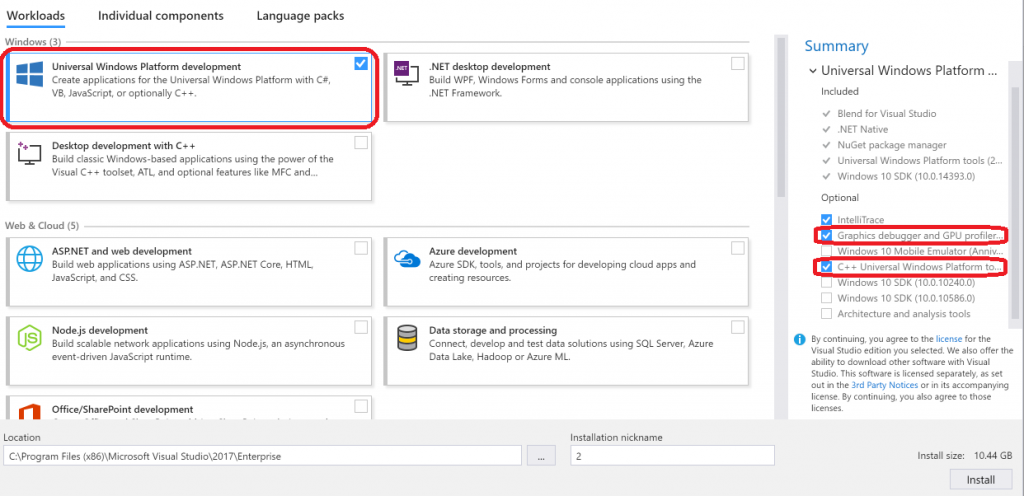
Visual Studio is available as a downloadable installer. Downloading and installing the appropriate version is the first step. Ensure to select the C# development workload during the installation process to include the necessary components. This installation process typically includes accepting the license agreement, selecting the installation path, and following the on-screen instructions. After installation, Visual Studio will be ready to host your C# projects.
Configuring the Environment
Configuring Visual Studio for game development and Windows application development often involves adjusting project templates, NuGet package management, and other IDE settings. For game development, you’ll want to install relevant game development libraries and frameworks. For Windows applications, ensure that the appropriate .NET framework is installed and correctly configured. Refer to the official Visual Studio documentation for specific configuration steps based on the application type.
Essential Tools and Libraries
Various tools and libraries significantly enhance the C# development experience, especially for game and Windows application development. A comprehensive set of tools ensures efficiency and productivity throughout the development lifecycle.
| Tool/Library | Function |
|---|---|
| Visual Studio | Integrated Development Environment (IDE) providing code editing, debugging, and deployment tools. |
| .NET Framework or .NET Core/.NET 6+ | Provides the runtime environment for C# applications. .NET Core/.NET 6+ offers improved performance and portability compared to older versions. |
| C# Compiler | Compiles C# code into executable code for the chosen platform. |
| NuGet Package Manager | Facilitates the management of third-party libraries and packages used in projects. |
| Unity (for game development) | A popular game engine that provides a comprehensive set of tools for game development. |
| XNA (for game development, less prevalent now) | A Microsoft game development framework. While less used now, understanding XNA can be beneficial in some scenarios. |
| DirectX (for game development) | A set of APIs for creating high-performance 2D and 3D graphics. |
| OpenTK (for game development) | A free and open-source library for creating games using OpenGL. |
Basic C# Syntax and Concepts
C# is a powerful, object-oriented programming language widely used for game development and Windows application creation. Understanding its fundamental syntax and object-oriented principles is crucial for building robust and functional applications. This section will delve into essential C# elements, illustrating their practical application in both game and Windows contexts.
Variables and Data Types
Variables store data within a program. C# supports various data types, each designed for specific kinds of information. Understanding these types is vital for efficient and accurate data manipulation.
C# data types include integers (int, long), floating-point numbers (float, double), characters (char), booleans (bool), strings (string), and more. Each type has a specific size and range of values.
Examples of declaring and initializing variables:“`C#int age = 30;string name = “Alice”;float price = 99.99f;bool isLoggedIn = true;“`
Operators
Operators perform operations on variables and values. They are essential for calculations, comparisons, and assignments.
Common operators include arithmetic (+, -,-, /, %), comparison (==, !=, >, <, >=, <=), logical (&, |, ^, !), and assignment (=, +=, -=, -=, /=).
Example illustrating arithmetic and comparison operators:“`C#int x = 10;int y = 5;int sum = x + y; // sum = 15bool isEqual = x == y; // isEqual = false“`
Control Flow Statements
Control flow statements determine the order in which code executes. They enable conditional execution and looping.
Essential control flow statements are if-else statements, for loops, while loops, and switch statements.
Example demonstrating an if-else statement:“`C#int score = 85;if (score >= 90) Console.WriteLine(“A”);else if (score >= 80) Console.WriteLine(“B”);else Console.WriteLine(“Below B”);“`
Object-Oriented Programming (OOP) in C#
C# is an object-oriented language. OOP principles, including encapsulation, inheritance, and polymorphism, are vital for creating maintainable and reusable code.
Encapsulation bundles data and methods into classes. Inheritance allows creating new classes based on existing ones. Polymorphism enables objects of different classes to respond to the same method call in different ways.
Example demonstrating a simple C# class:“`C#public class Player public string Name get; set; public int Health get; set; public void Attack() Console.WriteLine($”Name attacks!”); “`
Handling User Input in Windows Applications
Windows applications often require user input. C# provides mechanisms for capturing and processing this input.“`C#// Example of getting user input in a Windows Forms application.// … (Windows Forms setup) …private void button1_Click(object sender, EventArgs e) string input = textBox1.Text; MessageBox.Show($”You entered: input”);“`
Handling User Input in Games
Games also need to respond to user input, typically from a keyboard or mouse. C# can be used to detect and process these inputs.“`C#// Example of handling keyboard input in a game (simplified)// … (Game initialization) …if (Keyboard.GetState().IsKeyDown(Keys.A)) // Move left“`
Game Development Fundamentals in C#
C# offers a robust and versatile platform for game development, allowing developers to create engaging experiences across various platforms. This section dives into the core concepts and techniques essential for crafting games in C#. Understanding these foundations will empower you to build compelling games with C# and associated libraries.The core of game development involves managing the game loop, handling user input, and rendering the game’s visual elements.
This process is elegantly supported by C#, providing a framework for efficiently structuring and updating game elements.
Game Loops
Game loops are fundamental to game development. They are the repeating sequences of operations that drive the game’s logic and rendering. A typical game loop includes updating the game state, handling user input, and rendering the updated scene. This cyclical process ensures smooth gameplay and responsiveness. A well-structured game loop enhances performance and maintainability.
Input Handling
Effective input handling is crucial for user interaction in games. C# allows for seamless integration with various input devices, including keyboards, mice, and game controllers. Implementing input handling involves detecting user actions and translating them into game commands. This can involve polling input devices for changes or using more advanced input handling systems. Accurate and timely input processing ensures responsive gameplay.
Rendering
Rendering encompasses the process of displaying the game’s visual elements on the screen. C# integrates well with graphics libraries, providing tools for efficiently drawing and updating game objects. Rendering techniques significantly influence the visual quality and performance of a game. This involves drawing sprites, models, and other graphical elements, often using 2D or 3D graphics APIs.
Basic Game Mechanics
Basic game mechanics are the fundamental building blocks of a game. Examples include movement, collision detection, and scoring systems. These are implemented using C# code to define how the game objects interact and respond to various events.
- Movement: A game object’s movement is typically managed by updating its position based on user input or internal logic. This could involve simple translations or more complex calculations.
- Collision Detection: Detecting collisions between game objects is critical for implementing features like bouncing, triggering events, or destroying objects. Algorithms like bounding boxes or raycasting can be used for collision detection.
- Scoring Systems: These systems track and display player scores based on game events, often displayed graphically. This could involve incrementing a score variable or using a scoring system that dynamically updates based on game performance.
Integrating Graphics Libraries
Graphics libraries like OpenTK and MonoGame enhance game development in C#. They provide pre-built functionalities for handling graphics, such as drawing sprites, handling input, and managing game states.
- OpenTK: A free and open-source library for creating games and applications with OpenGL. It offers a flexible way to handle rendering and graphics in C#.
- MonoGame: A cross-platform framework that simplifies game development. It provides a robust set of tools for managing game elements, input, and rendering. It simplifies the process of developing games for different platforms like Windows, macOS, and Linux.
Creating a Simple 2D Game
This example demonstrates a basic 2D game using C# and OpenTK. The game will involve a player character that moves across the screen.
The game loop will handle updating the player’s position based on user input and redrawing the scene.
The game’s rendering will use the graphics capabilities of OpenTK to draw the player on the screen.
Advanced Game Development Libraries
Libraries like XNA and Unity provide more advanced functionalities for game development. They offer comprehensive tools and resources for building complex games.
- XNA: A Microsoft game development framework that provides a comprehensive set of tools and APIs. It’s particularly useful for games with more sophisticated graphics and gameplay requirements. XNA is now deprecated but remains a relevant historical context.
- Unity: A popular game engine used for developing 2D and 3D games. It provides a wide range of features and tools, including a visual scripting environment, which makes complex game development easier and more accessible. Unity is widely used for professional game development due to its robust features and community support.
Windows Application Development in C#
Windows application development in C# provides a powerful and versatile means of creating interactive applications for the Windows operating system. This approach allows developers to leverage the rich features of the .NET framework to build graphical user interfaces (GUIs) that provide a user-friendly experience. The ability to create sophisticated Windows applications is a significant advantage in the software development landscape.Developing Windows applications with C# extends beyond simple console-based programs.
It opens doors to designing robust, visually appealing interfaces that enhance user interaction and improve the overall user experience. This approach is critical for many modern software applications, especially those requiring complex data input, output, or intricate visual representations.
Fundamental Principles of Windows Application Development
Windows applications, unlike console applications, rely on a graphical user interface (GUI). This GUI allows users to interact with the application through visual elements like buttons, text boxes, and menus. Key principles include event handling, where the application responds to user actions, and object-oriented programming (OOP) for modularity and code organization. Understanding these principles is fundamental to creating effective and maintainable Windows applications.
Creating Graphical User Interfaces (GUIs)
C# offers several approaches to building GUIs. Windows Forms, a more traditional approach, provides a set of pre-built controls that developers can easily incorporate into their applications. WPF (Windows Presentation Foundation), a more modern approach, offers greater flexibility and control over the application’s appearance and behavior. Both frameworks provide the necessary tools for building visually appealing and functional interfaces.
Windows Forms Example
A simple Windows Forms application might involve a button that displays a message box when clicked. This demonstrates basic event handling. The application’s structure includes a form (the window), controls (the button), and code that defines the application’s behavior when these controls are interacted with. The form’s design is typically defined through a visual designer, allowing developers to arrange controls visually.
WPF Example
A WPF application might use data binding to dynamically update a list box based on data changes. This example showcases a more complex interaction, highlighting WPF’s data binding capabilities. The application’s structure can be more intricate, involving separate view models for data and presentation logic, thereby enhancing code organization and maintainability. WPF utilizes XAML (Extensible Application Markup Language) to define the user interface, separating the UI design from the code behind it.
Event Handling and User Interaction
Event handling is crucial in Windows applications. User actions, such as clicking a button or entering text, trigger events. The application’s code responds to these events by executing corresponding methods, enabling user interaction. This responsiveness is key to creating interactive applications. Examples include handling mouse clicks, key presses, and form resizing events.
Structure of a Basic Windows Application Project
A basic Windows application project typically comprises a main form, controls like buttons and text boxes, and code that defines the application’s logic. The project structure reflects the modularity and organization of the code. The code behind the form (e.g., the `Form1.cs` file) typically contains the event handlers and logic to respond to user interactions.
Differences Between Console and GUI Applications
Console applications rely on text-based input and output, while GUI applications utilize graphical elements for user interaction. GUI applications provide a more user-friendly experience, enabling a wider range of functionalities and user input methods. The structure, event handling, and code organization differ significantly between these two types of applications.
Resources and Further Learning

Congratulations on completing the foundational aspects of C# for game and Windows development! To truly master these skills, continuous learning and engagement with the wider community are essential. This section Artikels valuable resources for deepening your understanding and expanding your capabilities.
This section provides a compilation of online tutorials, documentation, books, courses, communities, and frameworks, crucial for expanding your knowledge base and bolstering your proficiency in C# game and Windows development. By leveraging these resources, you can effectively refine your skills and become a more adept programmer.
Online Resources
Numerous online resources offer comprehensive guidance and support for C# game and Windows development. These resources cater to various learning styles and experience levels.
- Microsoft Docs: Microsoft’s official documentation is an invaluable resource, providing detailed explanations, examples, and API references for C# and related technologies. This comprehensive documentation is often a first-stop for developers seeking accurate information on specific functionalities.
- C# Tutorials (YouTube and other platforms): Numerous online tutorials are available on platforms like YouTube, offering step-by-step instructions and practical examples. These tutorials can be highly effective for beginners seeking to grasp fundamental concepts in a visual and interactive format.
- GitHub Repositories: GitHub is a vast repository of open-source projects and code examples related to C# game and Windows development. Exploring these repositories allows you to examine real-world applications, learn from existing solutions, and potentially adapt or enhance these projects to suit your own needs.
Recommended Books and Courses
Books and courses provide structured learning experiences, often offering a deeper dive into specific areas than online resources. These resources are especially helpful for learners who prefer a more methodical approach.
- Pro C# 8 (by Andrew Troelsen): This book provides a comprehensive overview of C# programming, covering fundamental concepts and advanced features, relevant for both game and Windows development.
- C# 9 and .NET 5: From Beginner to Expert (by Andrew Troelsen): A contemporary guide to the latest C# features and .NET technologies, essential for modern development.
- Pluralsight Courses: Pluralsight offers numerous C# courses, providing a wide array of options covering various specializations. These courses often include hands-on exercises and projects to solidify learning.
Communities and Forums
Active online communities and forums offer opportunities for support, collaboration, and knowledge sharing with fellow developers. These communities can be instrumental in addressing challenges and discovering best practices.
- Stack Overflow: A popular question-and-answer platform, Stack Overflow is a go-to resource for resolving programming issues in C# and related technologies. You can often find solutions to specific problems or get clarifications on concepts.
- Reddit (r/csharp): A subreddit dedicated to C# programming offers a vibrant community for discussing various aspects of C#, including game and Windows development. This forum fosters a lively environment for exchanging ideas and receiving feedback.
Key Libraries and Frameworks
Specific libraries and frameworks are essential tools for building C# applications, including games and Windows applications. Mastering these tools is crucial for creating robust and efficient projects.
- Unity Engine: A widely used game engine offering a rich set of tools and features for game development in C#.
- WPF (Windows Presentation Foundation): A framework for building Windows applications with rich user interfaces.
- WinForms: A framework for creating traditional Windows applications, offering a more basic UI compared to WPF.
Learning Resources Summary
| Category | Resource | Description |
|---|---|---|
| Online Documentation | Microsoft Docs | Comprehensive C# and .NET documentation |
| Tutorials | YouTube Tutorials | Step-by-step instructions and practical examples |
| Books | Pro C# 8, C# 9 and .NET 5 | In-depth coverage of C# programming |
| Courses | Pluralsight | Structured learning with hands-on exercises |
| Communities | Stack Overflow, r/csharp | Support, collaboration, and knowledge sharing |
| Frameworks/Libraries | Unity Engine, WPF, WinForms | Tools for game and Windows application development |
Advanced Topics (Optional)
This section delves into more advanced aspects of C# programming, focusing on features beneficial for game and Windows application development. These advanced techniques enhance performance, scalability, and the overall sophistication of your projects. Understanding asynchronous programming and threading is crucial for creating responsive and efficient applications, while networking allows for communication between applications or game clients. Effective use of data structures and performance optimization techniques are essential for creating high-performing and maintainable code.
Asynchronous Programming and Threading
Asynchronous programming allows your application to perform tasks concurrently without blocking the main thread. This is vital for responsiveness in games and applications. Thread management, a critical aspect of this, permits concurrent execution of multiple tasks, improving overall application speed and performance. C# provides features like `async` and `await` s to facilitate asynchronous operations, making them manageable and less error-prone.
Using threads appropriately prevents your application from becoming unresponsive, especially during resource-intensive tasks. Examples include loading assets in games or performing complex calculations in Windows applications.
Networking in Games and Applications
Networking enables communication between multiple clients or applications. In game development, networking is essential for multiplayer functionality, allowing players to interact and share game states. In Windows applications, networking facilitates data exchange between applications or with external services. C# offers various libraries and frameworks for implementing networking, such as the .NET Framework’s `Sockets` class. Key considerations include choosing the appropriate networking protocol, handling network errors, and ensuring efficient data transfer.
Implementing robust error handling, message formats, and security measures are crucial in a networked environment.
Data Structures
Effective data structures are crucial for managing and accessing data efficiently. In game development, data structures like trees, graphs, or hash tables can manage complex game worlds, player data, or inventory systems. For Windows applications, data structures like lists, dictionaries, or queues can efficiently manage and access user data, configurations, or other application-specific information. Proper selection and implementation of data structures can dramatically affect the speed and efficiency of your applications.
Choosing the right data structure based on the specific needs of the application is paramount.
Performance Optimization Techniques
Performance optimization is crucial for creating smooth and responsive applications, especially in demanding scenarios like games. Optimizing code for performance involves techniques such as minimizing memory allocations, improving algorithm efficiency, and using appropriate data structures. For example, reducing the number of calculations or optimizing loops and conditional statements can lead to significant performance gains. Careful profiling of your application can help identify performance bottlenecks, allowing for targeted improvements.
Common Performance Issues and Solutions
| Performance Issue | Potential Solution |
|---|---|
| Inefficient algorithms | Using optimized algorithms, data structures, and employing more efficient code logic. |
| Excessive memory allocation | Using memory pools, reducing unnecessary object creation, and managing object lifecycles effectively. |
| Unnecessary object creation | Employing object pooling or using immutable objects where appropriate. |
| CPU bottlenecks | Optimizing algorithms, using multithreading and asynchronous operations to distribute tasks, and considering parallel processing. |
| Network latency | Using optimized network protocols, compression techniques, and minimizing the amount of data transferred. |
Last Recap

In conclusion, this guide has illuminated the path to C# proficiency for game and Windows development. By understanding the language’s core principles, configuring the development environment, and grasping the nuances of both game and application creation, you are equipped to embark on your programming journey. The provided resources and advanced topics offer a springboard for continued learning and exploration.